Friday, July 18, 2008

Phishing On Friendster!!!!!!

This Site In Friendster is SAFE....

While This One Is example of Phishing Profile In Friendster 

Do Not Add any Account like This Because If YOu Click Any Buttons From 

this Account You Will Be ask To login And if You Login, YOur infos Will Be Revealed By This User Including Your Password & Email add.

Friendster Worm


if u all see the code below(in red) inside yr friendster profiles

under "edit profiles", click on the tap "customize", under 

Add Media


pls do the following 


If you saw that code in your profile, erase/remove it immediately. 

First thing to do is remove that code in your media box, then delete your temporary internet files on IE/clear private data on Firefox. 
Second is you need to change your password immediately. 
And Last you need to generate your codes again.

Sunday, July 13, 2008

DotA-Allstars 6.53

* Added a new Sentinel Hero (Goblin Clockwerk)
* Localized script text to allow cross-language compatibility
* Completely reworked and improved the way RD hero picking is done
* Imported a temporary rune model to replace the default one until the death animation in 1.22 is fixed (thanks PGRu-Unexpect3D)
* Reworked Lycanthrope a bit

* Removed the "undroppable while in cooldown" mechanism added a long time ago to prevent item abuses. This mechanism is no longer needed as of Warcraft patch 1.22
* Improved Fire Panda's movement speed per level
* Observers and replays now see a $ symbol above a dying creep when a player gets gold for killing a unit
* Improved Drow's Marksmanship slightly
* Increase AOE on Dispersion
* Lowered Soul Keeper's base movement speed and increased cast point
* Improved Stifling Dagger
* Improved Open Wounds a little
* Decreased Mana Void's cooldown
* Lowered Infest manacost

* Fixed a minor bug with the order of the heal and damage operation on Purification when combine with Aphotic Shield on a nearby enemy
* Fixed a bug with Magic Immunity and Haunt
* Fixed a bug with Song of the Siren and Berserker's Call
* Fixed a bug with selling Aghanim's Scepter
* Fixed a minor bug with Soul Assumption and buying items
* Fixed a bug with Magic Immunity and Strygwyr's Thirst
* Fixed Berserker's Call interaction with Neutrals at night
* Fixed Stout Shield hotkey conflicting with Kelen's Dagger in the Goblin Shop
* Fixed a bug with Shackles and Berserker's Call
* Fixed a bug with Magic Immunity and Sand Storm
* Fixed Mana Leak to not trigger off of Exort/Quas/Wex
* Fixed -ah for observers

* Added Tavern colors (218144)
* Added a new blink animation for Antimage
* Improved Magic Missile cast effect (170262)
* Added a visual effect for when Dispersion is damaging units
* Improved Shapeshift animation (186555)
* Improved Chaos Knight's Blink Strike cast effect (222605)
* Added new icon for Ethereal Jaunt (227376)
* Added a visual effect when Necrolyte regains mana with Sadist
* Swapped icon positions of Sange and Yasha in the recipe shop
* Added a new Balanar hero story (by Grujah.Noob)
* Added a new Lina Inverse hero story (by Wyvernoid)
* Added a new Medusa hero story (by Inferno[DK])
* Added a new Sand King hero story(by Yousuckatdota)
* Added a new Shadow Priest hero story (by miel09)
* Added a new Warlock hero story (by Inferno[DK])

How to Enable or Disable Windows Task Manager

Task Manager is a versatile task management and system utility in Windows operating system. With Task Manager, user can view detailed information about computer performance (CPU usage, physical memory, kernel memory, handle, thread, commit charge, etc.), running applications, processes, network activity and statistics, logged-on users, and system services. Besides system information, Task Manager can also be used to set process priorities, processor affinity, forcibly terminate processes, and shut down, restart, hibernate or log off from Windows.

In view of its powerful capabilities and functionality, administrator may want to disable Task Manager in the computer to disallow user from running Task Manager, although administrator also needs to restrict user access to Registry Editor or ability to change system registry for the control to be useful. On the other hand, some users may be wondering why the Task Manager has been disabled and cannot be run, which often caused by intelligent malware and Trojan to prevent users from terminating the malicious process. In any way, disable or enable Task Manager can be done by just a simple registry change.

How to Disable Task Manager

  1. Click Start -> Run, and then type regedit, then press Enter. In Windows Vista, just type regedit in Start Search, and press Enter.
  2. Navigate to the following registry key:

    To block Task Manager from current logged on user:
    HKEY_CURRENT_USER\Software\Microsoft\Windows\CurrentVersion\Policies\System

    To block Task Manager on local computer for all users:
    HKEY_LOCAL_MACHINE\SOFTWARE\Microsoft\Windows\CurrentVersion\Policies\System

    Note that if “System” does not exist, simply create a new key by right clicking on Policies, and select New -> Key, and name the new folder as System.

  3. Right click System registry key, and then select New -> DWORD (32-bit) Value.
  4. Name the new registry entry as DisableTaskMgr.
  5. Double click on DisableTaskMgr, and assign its value data as 1.
  6. Quit Registry Editor.

With immediate effect, user can no longer run or open Task Manager. Any attempt to run “taskmgr.exe” or using Ctrl+Shift+Esc or Ctrl-Alt-Del (via Windows Security dialog) key combination will has the error message saying “Task Manager has been disabled by your administrator”.
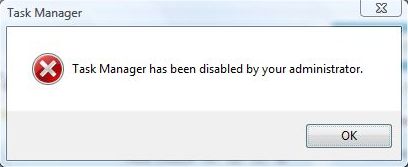
Disabled Task Manager

Beside, the Task Manager item in right click context menu is grayed out and disabled when user right click on Taskbar.

How to Disable Task Manager

  1. Click Start -> Run, and then type regedit, then press Enter. In Windows Vista, just type regedit in Start Search, and press Enter.
  2. Navigate to the following registry key:

    HKEY_CURRENT_USER\Software\Microsoft\Windows\CurrentVersion\Policies\System

  3. Locate DisableTaskMgr in the right pane.
  4. If found, right click on DisableTaskMgr, and select Delete to remove the registry entry, or set its value data to 0.
  5. Then navigate to the following registry key:

    HKEY_LOCAL_MACHINE\SOFTWARE\Microsoft\Windows\CurrentVersion\Policies\System

  6. Locate DisableTaskMgr in the right pane.
  7. If found, right click on DisableTaskMgr, and select Delete to remove the registry entry, or set its value data to 0.
  8. Quit Registry Editor.

Task Manager is now available. The hack or trick works in most Windows operating system, including Windows Vista, Windows XP and Windows Server 2003/2008.

Disable and Prevent Laptop or Notebook from Sleep (Standby) or Hibernate When Closing the Lid

On a laptop or notebook computer, when user closing the lib, the computer will turn off the LCD screen display and then put the computer into sleep (stand by in Windows XP) or hibernation mode. In Windows XP and Windows Vista, the behavior when closing the lid on laptop or notebook PC can be changed and tweaked to user likings.
Turn off or disable ability for laptop and notebook to sleep or hibernate itself is useful for users who want to leave the computer for a while, and want to be able to start work immediately upon opening the lid when returning to computer. Do nothing while closing lid also prevent the system, from requesting the user’s password upon returning from sleep (see how to disable password requirement on wakeup), stanby or hibernation after re-opening the lid.

How to Stop Laptop/Notebook Goes To Sleep or Hibernation when Closing Lid in Windows Vista

  1. Log on to your computer as an administrator. Click on Start, go to Control Panel -> System and Maintenance -> Power Options.
  2. Click on Change plan settings for the currently active plan.
  3. Click on Change advanced power settings link.
  4. In the “Power Options” dialog box’s “Advanced Settings” tab for the active power plan, expand Power buttons and lid.
  5. Expand Lid close action.
  6. Change the value to Do nothing for “Lid close action” by selecting a new option from drop down menu for both On battery and Plugged in.

    Disable Sleep or Hibernate on Closing Lid

    Based on own preference, it’s possible to set other action from the menu too. Available for selection is Do nothing, Sleep, Hibernate and Shutdown.

  7. Click OK button.

How to Disable Notebook Computer to Stand By or Hibernate on Closing Lid in Windows XP

  1. Log on to your computer as an administrator. Click Start, and then click Control Panel.
  2. Click Performance and Maintenance.
  3. Click Power Options.
  4. Click Advanced tab.
  5. Under “Power buttons” section, select Do nothing from drop down menu for When I close the lid on my portable computer option.

    Turn Off Stand By on Closing Lid

    Again, any other settings such as Stand by and Hibernate can be set based on own preference.

  6. Click OK button.

Saturday, July 5, 2008

Hellboy II: The Golden Army


Running Time: Unknown
Release Date: July 11, 2008
MPAA Rating: PG-13
More Movie Info | Production Photos
Starring: Ron Perlman, Selma Blair, Jeffrey Tambor, Doug Jones and Ladislav Beran. 
Directed by: Guillermo del Toro.

DotA Allstars Replays

Go To This Link

List of replays:


Premium DotA Replays PDIP Right to Fight: Pag-ibig vs TNS


 GG ADC: Philippines vs Malaysia
ChiLL vs Flow


 Wiz Team2Beat Finals


 PDIP 2008 Season 1 Division 2 Week 3


 PDIP Right to Fight: Pag-ibig vs Baguio


 DotAStrategy.com Tournament Finals


 GGC ADC Round 4: ChiLL vs Mineski


 CDO Big Bozz Tournament


 PDIP 2008 Season 1 Division 2 Week 4


 PDIP 2008 Season 1 Division 2 Week 1


 Wiz Team2Beat Tournament Semifinals


 Advance Attitude Tournament Replays


 Wiz Team2Beat Tournament Eliminations


 PDIP 2008 Season 1 Division 1 Week 1


 DotAStrategy.com Tournament Round 1


 DotAStrategy.com Tournament SemiFinals


 DotAStrategy.com Tournament Round 2
 

 GGC ADC: Philippines vs China


 Philippine Regional Wars - Mindanao Finals: ChiLL vs CORPO

 GGC ADC: Philippines vs India

 GGC ADC: Philippines vs Thailand


 GGC ADC: Philippines vs Indonesia


 La Union Cyber Games: Team Manila vs Team Baguio Game 3

 Davao City's Team ChiLL vs Malaysia's Cybertime

 DLST 6 FINALS


 Davao City's Team CORPO vs General Santos City's Bio


 GCC ADC Finals: Mineski vs Papi

 DLST 6 Round 2


 GGC ADC Rounds 1 and 2: ChiLL and CORPO Replays


 DLST 6 Losers' Bracket Semi-finals


 DLST 6 Semi-finals
Author: polar
Last Post: polar Tue Oct 16, 2007 4:11 pm 

 DLST 6 Losers' Bracket Round 3
Author: polar
Last Post: polar Tue Oct 16, 2007 4:05 pm 

 DLST 6 Losers' Bracket Round 2
Author: polar
Last Post: polar Tue Oct 16, 2007 3:56 pm 

 DLST 6 Losers' Bracket Round 1
Author: polar
Last Post: polar Tue Oct 16, 2007 3:39 pm 

 DLST 6 Round 1
Author: polar
Last Post: polar Tue Oct 16, 2007 3:27 pm 

 Davao City's Team ChiLL CORPO vs Malaysia's Cybertime
Author: polar
Last Post: polar Sun Oct 14, 2007 10:46 am 

 BoyzTrek Jacinto DAVAO CITY Tournament: The BLOODCLASH!
Author: polar
Last Post: polar Mon Oct 01, 2007 8:59 am 

 Sequel Juan Luna (Davao) Underdogs Tournament Replays
Author: polar
Last Post: polar Mon Sep 17, 2007 11:15 am 

 DAF Tournament Replays
Author: polar
Last Post: polar Fri Sep 14, 2007 1:58 am


DotA Allstars 6.52e

Download Here

6.52e Changelog:
=================
* Fixed some critical bugs introduced in the 1.22 patch

Wednesday, July 2, 2008

I Knew I Love You


Angel Locsin & Piolo Pascual's 1st MOVIE in STAR CINEMA entitled "I Knew I Loved You"
Starring: Angel Locsin and Piolo Pascual
Directed by: Cathy Garcia-Molina